 Follow us on Facebook
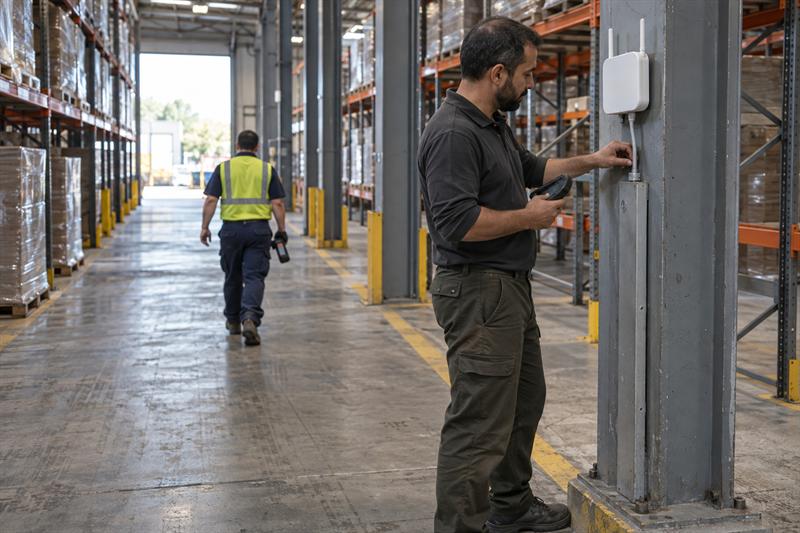
Why warehouse WiFi issues are different from office WiFi problems
Warehouse wireless problems behave differently because the environment is different. High ceilings, metal racking, dense inventory, long aisles, and moving equipment all affect how signals travel and where performance starts to break down.
That is why a network that looks acceptable in a dashboard can still frustrate workers on the floor. At Ascio Wireless, LLC, this pattern often shows up in facilities where the original design focused on broad coverage instead of how scanners and mobile devices actually move through the space.
Warehouse performance issues often start when a network is judged by whether a device can connect at all instead of whether it can stay stable while moving. That gap can lead to dropped sessions, repeated scans, voice clipping, and delays that slow down operations even though the WiFi appears to be up.
For a broader look at how these environments differ, see network design for warehouses vs. offices.
How the physical environment changes wireless performance
Metal shelving and dense inventory can block, absorb, and reflect wireless signals. Long aisles also create directional coverage challenges, and changing inventory levels may shift how signals behave over time.
This is where many warehouse problems begin. A design that works well in an open area can weaken inside aisles, around end caps, or where workers move from one zone to another. If the environment changes over time, the network can drift from acceptable to unreliable without any settings being changed.
Why scanners and voice devices fail before laptops do
Scanners and voice devices are often less forgiving than laptops because they depend on stable connectivity while moving. They are more likely to expose roaming delays, packet loss, and short interruptions that a laptop user might never notice.
A common pattern is that office staff report no obvious WiFi problem while warehouse teams deal with frozen sessions, missed scans, or audio breakup. That usually means the issue is not simple coverage. It more often points to wireless continuity under motion, which is where warehouse design either holds up or starts to fail.
Common warehouse WiFi symptoms and what they usually mean
The fastest way to troubleshoot warehouse wireless issues is to match the symptom to the likely cause. Generic troubleshooting often wastes time because scanner drops, voice instability, and zone-specific failures usually point in different directions.
For a wider troubleshooting framework, see this business WiFi troubleshooting guide.
- Scanner disconnects during movement: often point to roaming delays, access point placement problems, or weak signal quality between coverage zones.
- Voice cuts out while workers walk or drive: often points to jitter, packet loss, or handoff instability.
- Strong signal but poor device performance: often points to retries, interference, contention, or upstream network issues.
- Problems only in certain aisles or work zones: often point to physical layout, racking effects, or coverage mismatch.
Scanner disconnects and frozen sessions
When scanners disconnect or freeze mid-task, common causes include roaming delays, poorly aligned access point coverage, client settings, or unstable paths behind the wireless network. The pattern matters more than the complaint alone.
If disconnects happen while workers are moving, especially at aisle transitions or zone boundaries, that often means the scanner is struggling to hand off cleanly between access points. If the issue keeps repeating in the same area, the network design is often the first place to look, not the scanner itself.
Voice dropouts while moving
Voice problems often appear before general WiFi complaints because voice is sensitive to delay, jitter, and packet loss. A connection that feels acceptable for basic data work can still disrupt voice when roaming is inconsistent.
This usually gets worse when workers move continuously through the building. The network has to maintain quality during handoffs, not just while the device is standing still. If audio drops line up with movement, the issue is often tied to roaming behavior or coverage transitions.
Strong signal but poor performance
Strong signal does not always mean good performance. A scanner or mobile device can show acceptable signal strength while still dealing with retries, contention, co-channel interference, or delays elsewhere in the network path.
This is one of the most misunderstood wireless symptoms. A common pattern is seeing “good bars” while applications lag, scans fail, or devices reconnect slowly. That often means the problem is signal quality, roaming, or capacity pressure rather than raw coverage. For a clearer breakdown, see WiFi coverage vs. capacity.
Problems limited to certain aisles or zones
Location-based failures are one of the strongest troubleshooting clues in a warehouse. If the same aisle, dock area, mezzanine, or transition point keeps producing problems, that often points to a physical design issue.
This can create repeated worker frustration because the problem feels random to operations but is actually tied to the environment. When complaints follow the same locations, the layout, access point position, and signal path usually need a closer look.
A practical troubleshooting checklist for warehouse scanners and mobile devices
The right sequence matters. Random settings changes often make troubleshooting harder because they blur the real cause and create new variables.
Start by isolating whether the issue is wireless, wired, device-specific, or application-related. Then compare that information to where the failures happen and how devices move through the facility.
Step 1: Confirm whether the issue is wireless or upstream network related
Start by checking whether the problem only affects WiFi devices or whether it also points to switching, uplinks, server response, or application behavior. Wireless complaints are not always wireless root causes.
In persistent scanner cases, the access point may look normal while the wired path behind it has instability, a damaged run, a bad uplink, or a switch-side problem. When that gets missed, teams often keep tuning WiFi settings while the real fault stays in place.
Step 2: Map complaints to physical locations and movement patterns
Document where the problem happens and what the worker is doing when it happens. Aisle entrances, end caps, dock doors, and transitions between open floor and dense storage are common trouble spots.
If failures keep showing up along the same physical paths, the cause is often design or placement rather than random device behavior. This is where troubleshooting becomes more useful, because repeated location-based patterns give a clear direction.
Step 3: Review AP placement and channel strategy
Access point placement has to support how workers move, not just how a floor plan looks on paper. In warehouses, overhead placement that covers open floor areas can still leave aisles underperforming where scanners and voice devices need stable handoffs.
Channel overlap and antenna orientation also matter. If placement is broad but not aligned to aisle behavior, the result is often inconsistent roaming and weak performance in the exact areas where operations depend on continuity. For more on this, review these access point placement best practices.
Step 4: Review device capabilities and configuration
Scanners and voice devices do not all behave the same way. Supported bands, firmware, roaming behavior, power settings, and authentication design can all affect how reliably a device holds a connection.
This gets overlooked when multiple device types share the same SSID and are expected to behave the same way. If scanners are business-critical and highly mobile, their configuration and network treatment often need to reflect that. Otherwise, the network gets judged by general connectivity while workflow reliability keeps slipping.
Step 5: Compare signal readings to user experience, not just dashboard status
Do not stop at signal bars or top-level controller views. Compare what users report with latency, retries, packet loss, and handoff behavior to understand whether the connection is actually usable during work.
If the dashboard shows connected devices but workers still lose sessions or voice quality, that often means the network is failing under motion or load. This is where technical readings need to be matched to real device behavior, not treated as proof that the network is healthy.
If scanner drops keep happening in the same zones, the issue likely needs direct testing.
- Workers lose sessions at aisle entrances or while driving between work areas
- Voice quality drops only when users are moving
- Devices show connected status but apps still freeze or lag
- Multiple settings changes have been tried without lasting improvement
Those signs often mean the problem is no longer a quick settings issue. The layout, access point placement, or supporting network path likely needs to be tested directly.
Warehouse WiFi causes that are often missed
The biggest troubleshooting mistakes usually happen when every symptom is treated like a coverage problem. In warehouses, recurring issues often come from design assumptions that looked fine during deployment but fail under real movement and device behavior.
What gets missed most often is how frequently warehouse failures are tied to physical design mismatch, not just controller settings.
Overhead AP designs that look fine on paper but fail in aisles
Open-area coverage maps can hide aisle-specific weaknesses. A design that blankets the floor from above may still produce unstable performance between racks where signals are blocked, reflected, or stretched in the wrong direction.
This is a common pattern in facilities designed around general visibility instead of scanner movement paths. When that happens, the network appears sufficient at a high level but may fail where actual work is happening.
Roaming delays between access points
Roaming delays cause some of the most frustrating warehouse problems because they are intermittent, movement-based, and easy to misread. Devices stay connected just long enough to seem healthy, then may drop sessions at exactly the wrong moments.
This often gets worse when teams respond by simply raising power or increasing overlap everywhere. More power does not automatically improve roaming. In some cases, it creates new contention or delays cleaner handoffs, which pushes the same problem into a different form.
Shared SSIDs mixing scanner traffic with general-purpose devices
Shared SSIDs can create troubleshooting noise when highly mobile scanners, voice devices, and general-purpose devices are all grouped together. Their usage patterns, sensitivity to delay, and connection requirements are not the same.
This can lead to confusing results. One device type appears fine, another struggles, and the network gets treated as inconsistent when the real issue is that critical mobile workflows were never separated from lower-priority usage patterns.
Cabling or uplink issues that look like wireless problems
Not every scanner complaint starts in the air. Damaged cabling, poor terminations, uplink instability, or switch-side issues often show up as disconnects, lag, or failed transactions on wireless devices.
This is where problems can drag on if they are handled incorrectly. Teams may keep adjusting wireless settings because the symptom appears on a scanner, while the real issue sits behind the access point. In environments with persistent trouble, this is one of the first distinctions worth confirming.
When troubleshooting points to a design or infrastructure fix
There is a point where more tuning stops being productive. If the same failures keep coming back, the issue often sits in the design, placement, cabling, or broader network path.
Ascio Wireless, LLC focuses on long-term infrastructure support, which matters here. Warehouse wireless problems rarely stay isolated. They can turn into downtime, repeated labor, delayed workflows, and unreliable device behavior that keeps interrupting operations.
Signs a wireless survey is the right next step
- Problems repeat in known aisles, transitions, or work zones
- Scanners or voice devices keep failing after multiple settings changes
- Inventory layout, racking, or facility use has changed over time
- Roaming behavior needs to be validated along actual worker paths
When those signs are present, the network often needs direct measurement in the real environment. For a closer look at that process, read network assessment vs. wireless site survey.
When AP relocation, cabling changes, or network support may be needed
If troubleshooting keeps pointing back to the same parts of the building, access point relocation is often more practical than more configuration changes. If wireless symptoms line up with backhaul instability, damaged runs, or patching problems, structured cabling or network repair may be the real fix.
This is where wireless surveys, networking support, structured cabling, technical support, and on-site network support fit naturally. The goal is not another quick adjustment. The goal is a network that matches how the facility actually works and keeps performing over time.
Key Takeaways
- Warehouse WiFi issues should be diagnosed by symptom, location, movement pattern, and device type.
- Strong signal does not always mean stable performance.
- Recurring scanner and voice problems usually point to roaming, placement, interference, or upstream network issues.
- Repeated failures in the same zones usually mean the physical environment is driving the problem.
- When settings changes stop helping, the next step is often a survey, infrastructure review, or targeted on-site troubleshooting.
Conclusion
The real problem in warehouse WiFi troubleshooting is not just weak coverage. It is the gap between a network that appears connected and a network that stays reliable for scanners, voice devices, and mobile workers under real movement and real workload.
If that gap is not addressed properly, the same symptoms often keep coming back. Sessions may drop, scans may fail, workers may repeat tasks, and operations can lose time chasing issues that were never isolated correctly in the first place.
Ascio Wireless, LLC is a practical next step when those patterns are already showing up. The work often requires more than adjusting settings. It requires wireless troubleshooting tied to physical layout, access point placement, cabling, and long-term network performance so the underlying issue can be identified and corrected.
How Ascio Wireless, LLC approaches warehouse WiFi problems
At Ascio Wireless, LLC, warehouse WiFi problems are approached as infrastructure problems first and settings problems second. That matters because recurring scanner issues often develop from the interaction between wireless design, cabling, layout, and device behavior, not from one isolated setting.
A common pattern is repeated troubleshooting attempts that improve symptoms briefly but never remove the root cause. The practical approach is to identify where the breakdown starts, determine whether it is wireless, wired, or both, and then align the network to the facility instead of forcing the facility to work around the network.
FAQ
Can warehouse scanners have strong WiFi signal and still disconnect?
Yes. Strong signal only shows that the device can hear the network. It does not mean the connection stays stable while the device is moving or passing between access points.
A scanner that drops while traveling between aisles often points to roaming friction, retries, interference, or a weak path behind the access point. This is why “good signal” and “reliable workflow” are not the same thing.
What causes WiFi problems only in certain warehouse aisles?
Problems in specific aisles usually come from physical layout. Metal racking, dense inventory, aisle geometry, antenna direction, and access point placement all shape how wireless performs in those locations.
The important distinction is that repeatable location-based failures are useful evidence. If the same aisle keeps causing disconnects, the issue is often tied to design or placement rather than random device behavior.
Why do voice devices fail while standing still less often than when workers are moving?
Voice traffic is sensitive to delays and interruptions. While standing still, a device may hold one access point connection long enough to sound fine. Once the user moves, handoffs between coverage zones become the real test.
If voice breaks up in motion but not at rest, that often means the network is failing during roaming rather than failing to provide basic signal. The key point is that continuity under movement needs to be checked, not just coverage in place.
Should warehouse scanners use the same SSID as office devices?
Not always. Scanners, voice devices, and office devices do not behave the same way, and they do not always belong on the same wireless design path.
When critical mobile devices share space with general-purpose usage, troubleshooting becomes less clear and performance expectations get mixed together. The deciding factor is not the SSID itself. It is whether the devices have different mobility, authentication, or performance needs that affect reliability.
When does a warehouse WiFi issue require a wireless survey instead of more settings changes?
A survey becomes the right next step when problems are persistent, repeatable, and tied to the environment. That includes failures in known locations, recurring roaming issues, and situations where multiple configuration changes have not fixed the problem.
What changes the decision is repeatability. If the same patterns keep showing up in the same places, the network often needs direct measurement in the real space instead of more guessing from dashboards.
Can cabling or switch issues look like wireless scanner problems?
Yes. Bad uplinks, damaged cable runs, poor terminations, or switch-side instability often appear as wireless problems because the symptom shows up on a mobile device.
The useful distinction is that the scanner may be the messenger, not the cause. When wireless settings look normal but performance is still inconsistent, the wired network behind the access point becomes a likely source of failure.