 Follow us on Facebook
Quick Answer: WiFi coverage determines where people and devices can connect, while WiFi capacity determines whether the network can support the number of active users and applications in that space. If devices show strong signal but meetings, scanners, cloud apps, or voice services slow down during busy periods, the issue may be related to capacity, wireless design, or the wired infrastructure supporting the access points.
Businesses may add access points or upgrade internet service before identifying the actual bottleneck. Ascio Wireless, LLC evaluates where problems happen, when they happen, which applications are affected, and whether the network is designed for current demand.
WiFi Coverage and Capacity Are Different Problems
What WiFi Coverage Means
WiFi coverage is the area where a device can receive a usable wireless signal. In a business environment, that includes offices, floors, warehouse aisles, workstations, conference areas, loading zones, and other places where people or connected equipment need network access.
Coverage is shaped by access point placement and the physical environment. Concrete walls, metal shelving, machinery, dense storage, elevator areas, high ceilings, and floor-to-floor construction can affect how a signal travels through a building.
Coverage problems are usually tied to a location. If employees consistently lose connection in the same back office, warehouse aisle, stairwell, or conference room corner, the wireless signal may not be reaching that area reliably. This can lead to dropped connections, slower work, and recurring complaints from the same part of the facility.
What WiFi Capacity Means
WiFi capacity is the network’s ability to support the users, devices, and applications that are active at the same time. It is not just about how many devices can see the WiFi network. It is about whether those devices can complete the work they need to do when demand is highest.
Capacity planning considers concurrent users, client density, airtime, application demand, and peak activity. A conference room with 25 people on video calls has different requirements than an office with 25 people checking email throughout the day.
Business WiFi capacity includes more than laptops and phones. Guest devices, tablets, barcode scanners, printers, cameras, voice systems, cloud applications, and IoT equipment can all place demands on the network. For a deeper look at these requirements, see WiFi capacity planning for businesses.
Why Full WiFi Bars Can Still Mean Poor Performance
Full WiFi bars generally indicate that a device has a strong connection to an access point. They do not show whether that access point has enough available capacity for everyone using it.
Wireless devices share airtime. When many devices are active in the same area, they compete for that shared resource. A crowded training room can have strong signal coverage but still experience frozen video calls, slow cloud applications, and unreliable voice service.
A common pattern is that signal looks good during a walkthrough, but performance drops when the room fills up or operational activity increases. The question is not only whether WiFi reaches the room. It is whether the room is designed for the workload taking place there.
Wireless performance also depends on the infrastructure behind the access point. Cabling, switches, Power over Ethernet, internet service, and application behavior can all affect the user experience.
WiFi Coverage vs. Capacity: The Business Difference at a Glance
- WiFi coverage asks: Can employees, guests, and devices connect reliably where work happens?
- WiFi capacity asks: Can the network support active users and business applications when demand is highest?
- Coverage problems usually look like: dead zones, weak signal, dropped connections while moving, and issues limited to certain locations.
- Capacity problems usually look like: slow WiFi in crowded areas, unstable calls during busy periods, and poor performance despite a strong signal.
- Coverage fixes often involve: access point placement, physical layout, and signal distribution.
- Capacity fixes often involve: access point density, channel planning, device demand, application requirements, and wired uplink readiness.
Many businesses have both issues at the same time. A building expansion, new conference room, added warehouse devices, increased guest access, or more cloud-based work can expose coverage gaps and capacity limits that were not apparent when the network was first installed.
Signs Your Business Has a WiFi Coverage Problem
Dead Zones and Weak-Signal Areas
A coverage problem usually appears in the same physical locations. Users may have difficulty connecting in a remote office, warehouse aisle, loading area, hallway, break room, exterior work area, or section of another floor.
If the problem follows the location rather than the time of day, coverage is a useful place to start. Unaddressed gaps can lead to workarounds such as employees relocating to find signal, using mobile hotspots, or relying on inconsistent connections for operational tasks.
Connections Drop When Users Move Through the Building
Employees moving between offices, floors, departments, or work areas need their devices to transition between access points without interrupting their connection. That transition is called roaming.
When calls drop or applications disconnect while employees move through the building, the issue may involve access point placement, coverage overlap, radio settings, or device behavior. In environments that depend on mobile devices, voice services, scanners, or tablets, these interruptions can disrupt normal work throughout the day.
Roaming is not always a simple weak-signal issue. A device may see multiple access points but still transition poorly if the overall wireless design does not support movement through the facility.
Problems Are Concentrated Around Physical Obstacles
Building materials and equipment can change wireless performance. Concrete, metal, shelving, machinery, elevator areas, dense walls, and high ceilings can weaken or redirect signals in ways that are not obvious from a floor plan.
Problems can arise when access points are placed based only on visual estimates. A room that appears close to an access point may still perform poorly because physical obstacles sit between the access point and the devices using it.
Businesses with warehouses, commercial spaces, or mixed-use facilities should consider the difference between office conditions and operational areas. Network requirements are not always the same, and placement decisions should reflect those differences.
Signs Your Business Has a WiFi Capacity Problem
WiFi Slows Down in High-Demand Areas
Capacity problems often appear where many devices gather and work at once. Conference rooms, training spaces, shared work areas, waiting rooms, classrooms, break areas, lobbies, and shift-change locations are common examples.
A room can have excellent coverage and still perform poorly when many connected devices begin using video, voice, cloud applications, or large file transfers at the same time. Users see a network that appears available but does not consistently support the work being done.
Performance Declines at Predictable Busy Times
If WiFi slows down during scheduled meetings, training sessions, shift changes, guest events, or inventory activity, that timing is important. A predictable slowdown may be associated with concentrated demand, shared airtime, or a design that no longer matches actual use.
This pattern can emerge after a business grows without revisiting its wireless design. More staff, mobile devices, cloud tools, and connected equipment can increase demand gradually until the existing network begins struggling during the busiest parts of the day.
Documenting when the issue occurs gives a network review more value than a general report that WiFi is slow. Timing helps separate a capacity concern from a dead zone or an isolated device issue.
Video, Voice, Cloud Applications, or Scanners Become Unreliable
Real-time and business-critical applications can expose capacity issues before casual web browsing does. Video meetings may freeze, voice calls may become unstable, cloud platforms may lag, and barcode scanners may lose responsiveness when the wireless environment is under heavy demand.
The total number of devices is only part of the picture. What matters more is how many devices are active at once and what they are doing. A group of users checking messages places a different demand on WiFi than a group running video calls while operational devices stay connected in the same area.
If business-critical applications become unreliable during periods of concentrated activity, the network may benefit from a capacity-focused review. Asking users to adapt does not address the underlying demand pattern.
Why Adding Access Points Is Not Always the Right Answer
More Access Points Can Help, but Only With the Right Design
Adding access points can improve capacity in high-demand areas when they are placed and configured as part of a coordinated wireless design. More radios can distribute user demand more effectively in busy meeting areas, training spaces, and large operational environments.
But access point quantity should be the result of planning, not the first decision. Adding hardware without understanding user density, applications, existing radio conditions, and cabling support can create another round of troubleshooting.
Poor Placement Can Create New Wireless Problems
Access points need coordinated channel planning, suitable placement, and appropriate radio settings. Placing too many access points too close together can create overlap, interference, channel-sharing problems, and poor roaming behavior.
Some overlap is necessary so devices can move between access points. Excessive overlap can create a crowded radio environment where devices compete unnecessarily. Adding access points without a design review can make performance less predictable instead of more reliable.
Businesses planning to expand their wireless footprint can review access point placement best practices for offices, warehouses, and commercial spaces. Placement decisions should account for physical structure, work patterns, mounting options, and how devices move through the building.
The Wired Network Must Support the Wireless Design
Every access point depends on the wired network beneath it. Data cabling, switch ports, Power over Ethernet, uplink capacity, and equipment readiness all affect whether an access point can perform as intended.
A common source of long-term performance issues is adding newer access points while leaving aging cabling, limited switch capacity, or insufficient PoE unaddressed. The wireless project may then appear complete while the supporting infrastructure becomes another bottleneck.
A reliable wireless design connects radio planning with the physical network. That includes structured cabling, network switching, equipment placement, and a practical path for future additions. For more context, review enterprise WiFi design considerations.
What Determines the Right WiFi Design for a Business?
People, Devices, and Simultaneous Activity
The starting point is not the number of access points. It is the number of people and devices using the network at the same time.
Employees, guests, contractors, laptops, phones, tablets, scanners, printers, cameras, and IoT devices all need to be considered. A network designed around total device count but not peak simultaneous activity can run into trouble when the business is busiest.
Applications and Business-Critical Workflows
Not every application has the same network requirements. Video calls, voice services, cloud applications, inventory systems, point-of-sale tools, collaboration platforms, and connected operational equipment each respond differently to delay and interruption.
The right design should account for the workflows that matter most to the business. If scanners support inventory movement or voice service supports customer communication, those needs should carry more weight than general browsing traffic.
Building Layout and Installation Constraints
A practical wireless plan accounts for walls, ceilings, materials, floor changes, rack locations, cable pathways, electrical access, mounting restrictions, and high-interference areas. A design that looks correct on paper still needs to be feasible to install and maintain.
This is where a long-term infrastructure approach can make a difference. Access points need reliable cabling and power, and the network should remain understandable when future changes are required.
Growth, Layout Changes, and Long-Term Support
WiFi requirements change as the business changes. New staff, expanded space, additional guest access, new operational devices, revised floor layouts, and more cloud-based work can all change the load placed on the network.
Planning only for current conditions can create a predictable problem: the network works until the next growth phase, then performance complaints return. A better approach accounts for realistic change without overbuilding the environment from the start.
How a Wireless Survey Helps Separate Coverage Problems From Capacity Problems
What a Wireless Survey Can Reveal
A wireless survey evaluates the environment before a business commits to major equipment purchases or a redesign. It helps identify how the physical layout, signal behavior, high-demand areas, access point placement options, and supporting infrastructure affect wireless performance.
The survey process can help separate a coverage problem from a capacity problem. It can also identify when the issue involves configuration, cabling, switching, power delivery, or several connected factors.
Ascio Wireless, LLC provides wireless surveys to help define the scope before recommending changes. That approach can help prevent a common mistake: replacing equipment when the underlying issue is placement, demand, physical construction, or the wired infrastructure supporting the wireless network.
When a WiFi Heatmap Is Useful
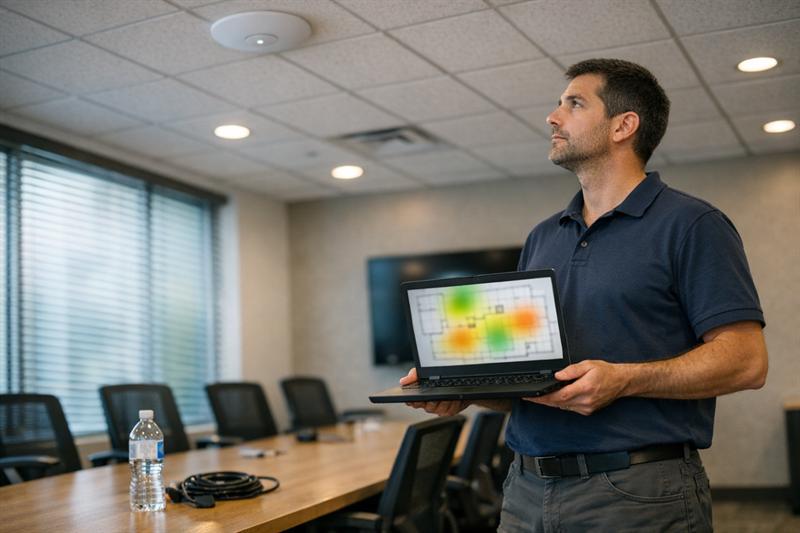
A WiFi heatmap visually shows how wireless signal is distributed across a space. It is useful for planning, communicating coverage conditions, and identifying areas where signal may be weaker than expected.
However, a heatmap is not a complete capacity assessment. A room can appear well covered on a heatmap and still struggle when many people use video, voice, cloud applications, or operational devices at the same time.
Understanding what a wireless heatmap shows and why it matters for network performance can help businesses avoid confusing visible signal coverage with reliable performance under real demand.
Why Validation After Installation Matters
Installation is not the end of the wireless design process. Validation helps confirm that the completed installation reflects the intended coverage and capacity plan.
Testing, documentation, and follow-up review matter because live facilities change. Work areas move, staff grows, applications change, and new devices join the network. Without validation and documentation, the business may have no clear baseline when performance changes later.
When a Wireless Assessment Is Needed
If employees see strong WiFi signal but performance declines during busy periods, a closer review may be warranted.
- Video calls, voice systems, cloud applications, or scanners become unreliable in crowded areas.
- WiFi problems appear at the same time each day, during meetings, training, shifts, or guest events.
- Users report dead zones, dropped connections while moving, or repeated problems in the same physical locations.
- The business is adding staff, devices, guest access, new space, or operational technology without updating its wireless design.
These signs can point to a network that no longer matches the environment it supports. A wireless survey and infrastructure review are practical next steps before purchasing more access points or replacing equipment.
A Practical Checklist Before Changing Your Business WiFi
- Document where WiFi issues occur, including specific rooms, floors, aisles, or operational areas.
- Record when issues happen, especially during meetings, busy shifts, training, events, or periods of high device use.
- Identify which devices and applications are affected.
- Determine whether the issue affects only wireless users or whether wired users and internet-dependent services are also slow.
- Review recent changes, including added staff, new cloud tools, expanded guest access, additional devices, layout changes, or new work areas.
- Review the access points, cabling, switches, and power delivery that support the wireless network before making broad equipment purchases.
This checklist turns general complaints into useful diagnostic information. It also reduces the risk of treating a business WiFi issue as a simple hardware shortage when the underlying concern involves design, capacity, or supporting infrastructure.
Conclusion: Design for Usable WiFi Performance, Not Just Signal
The real question is not simply whether WiFi reaches a room. It is whether the network can support the people, devices, and business-critical applications using that room when demand is highest.
Unresolved coverage and capacity issues can lead to repeated dropouts, slow cloud tools, failed video calls, unreliable operational devices, and reactive spending. Adding access points without understanding the environment can extend the problem because placement, channels, cabling, switching, and peak demand remain unaddressed.
Ascio Wireless, LLC can help when a business has recurring WiFi complaints, is planning an expansion, is redesigning a workspace, or is considering new access points. Wireless surveys, wireless services, networking, structured cabling, on-site support, and maintenance can be coordinated around the actual problem so the infrastructure is better positioned to support reliable performance over time.
Key Takeaways
- WiFi coverage is about where users and devices can connect.
- WiFi capacity is about how well the network supports simultaneous demand.
- Strong signal does not prove that a business has enough wireless capacity.
- Adding access points helps only when placement, channel planning, cabling, power, switching, and user demand are addressed together.
- A wireless survey can help identify whether the issue is coverage, capacity, configuration, wired infrastructure, or a combination of factors.
How Ascio Wireless, LLC Approaches Business WiFi Design
Ascio Wireless, LLC treats business WiFi as part of the larger network infrastructure, not as a standalone equipment purchase. The process starts with the business activity that depends on the network, then evaluates where users work, how many devices are active, what applications matter, and what wired infrastructure supports each access point.
This approach matters because quick fixes can fail for predictable reasons. Access points may be added without a capacity plan, coverage may be reviewed without considering demand, or new wireless equipment may be installed on cabling and switching that cannot support it properly.
A durable design accounts for assessment, installation, validation, documentation, maintenance, and future change. This gives businesses a clearer path to reliable wireless performance instead of repeated troubleshooting after a growth phase or layout change.
Frequently Asked Questions
What is the difference between WiFi coverage and WiFi capacity?
WiFi coverage is the area where a device can receive a usable wireless signal. WiFi capacity is the network’s ability to support users, devices, and applications that are active at the same time.
For example, a conference room may have signal coverage for every attendee. If the room becomes slow when everyone joins video calls and opens cloud applications, coverage is present but the available wireless capacity may not match the workload.
Why is business WiFi slow even when the signal is strong?
Strong signal shows that a device can communicate with an access point. It does not show how much shared airtime is available or whether the access point and wired network can support the number of active users.
In a busy training room, devices can show full WiFi bars while performance declines because users are competing for the same wireless resources. Interference, channel use, access point configuration, cabling, switching, internet service, and application demand can also affect the result.
Will adding more access points improve WiFi capacity?
More access points can improve capacity when they are installed as part of a coordinated design. In a high-density area, additional access points can help distribute demand across more radios.
Adding them without a plan can create overlap, interference, poor roaming, and unnecessary channel contention. The access points also need appropriate data cabling, PoE, switch capacity, and uplinks. The decision depends on the full environment, not the access point count alone.
How do businesses know whether they need a wireless site survey?
A wireless site survey is useful when WiFi problems continue, when the business is expanding or changing layouts, or when wireless connectivity supports important work such as voice, video, cloud tools, scanning, guest access, or connected equipment.
A survey evaluates the physical environment, likely signal behavior, high-demand areas, placement options, and supporting network infrastructure. This can help identify whether the main concern is coverage, capacity, configuration, cabling, switching, or a combination of issues.
Can a WiFi heatmap measure capacity?
A WiFi heatmap shows signal patterns across a building or workspace. It is useful for visualizing coverage and supporting placement decisions.
Capacity requires more information. A space with strong signal can still struggle when many users run voice, video, cloud applications, or operational devices at once. Device density, application demand, airtime, channel use, interference, and wired support all affect capacity.
Does faster internet service fix a WiFi capacity problem?
Faster internet service helps when the internet connection is the actual limitation. It does not automatically fix a local WiFi capacity issue.
If only wireless users in a crowded room struggle while wired users and other areas perform normally, the issue may be related to wireless capacity, access point placement, radio conditions, or the network infrastructure serving that area.