 Follow us on Facebook
What Is Multi-Site Network Standardization?
Multi-site network standardization is a documented approach to designing, installing, configuring, testing, documenting, and maintaining networks across multiple business locations. It creates a shared operating baseline so offices, warehouses, branches, and commercial facilities can follow consistent network practices even when their physical conditions differ.
A complete standardization plan includes:
- Network architecture and device roles
- Internet, WAN, and edge connectivity standards
- Switching, VLAN, addressing, and segmentation conventions
- Wi-Fi naming, access, placement, and validation practices
- Structured cabling, fiber, rack, power, and labeling requirements
- Documentation, testing, maintenance, and exception procedures
Standardization does not mean every site receives an identical device list. A small office, a high-density workspace, and a warehouse with long cable paths may have different physical requirements. The standard should define what remains consistent, what can change, and how each approved difference is recorded.
Why Inconsistent Network Designs Create Long-Term Problems
Troubleshooting Takes Longer When Every Site Works Differently
When locations use different naming conventions, switch-port configurations, VLAN assignments, Wi-Fi settings, or network diagrams, routine support can turn into discovery work. Before resolving an issue, the support team may need to determine how that particular site was built.
This pattern can emerge as organizations grow: a location is added quickly, a switch is replaced later, an access point is moved during a renovation, and the related records are never updated. The network may continue operating until a failure, move, or upgrade exposes the missing information. What should be a straightforward task can then become a site-specific investigation.
Consistent network standards give internal IT teams, field technicians, and support partners a clear starting point. They can identify how devices are named, where records are stored, which network segments exist, and how the location is intended to operate.
Uncontrolled Exceptions Can Become Technical Debt
Not every location can follow the baseline exactly. Carrier availability, building construction, rack placement, cable route length, floorplans, and operational equipment can require a different approach. The issue is not variation itself. Problems often start when a variation is installed as a workaround and never becomes part of the documented design.
- Controlled exception: A site needs a fiber uplink because of the distance between network rooms, and the design, labels, equipment records, and support documentation reflect that change.
- Unmanaged variation: A site has an added switch or relocated access point that exists only because someone remembers why it was installed.
Unmanaged variation can create technical debt because the next person supporting the network must reconstruct the design. This becomes harder as more locations open, more vendors work on the infrastructure, and more changes are made under time pressure.
Expansion Becomes Harder When Each Location Starts From Scratch
A repeatable baseline reduces the need to make the same design decisions for every new location. It gives the business a consistent way to plan connectivity, equipment roles, cabling scope, wireless requirements, installation steps, testing, and project handoff.
Without a baseline, expansion can lead to repeated decisions, uneven documentation, and design drift. A documented multi-location network design strategy can keep growth tied to a clear infrastructure plan instead of a series of isolated installations.
Start With a Network Baseline, Not a Device List
Selecting the same router, switch, or access point model for every site does not create a standard by itself. A device list does not explain where equipment belongs, how it connects, how it is configured, what it supports, or how future teams should maintain it.
A multi-site network baseline should define:
- Business and operational requirements
- Approved network topology and device roles
- Connectivity and edge design principles
- Wi-Fi, cabling, labeling, and equipment-room requirements
- Configuration and documentation conventions
- Testing, acceptance, maintenance, and change procedures
- Rules for approving and recording site-specific exceptions
The most useful standard is one that internal IT, installers, support teams, and future network partners can follow without relying on undocumented knowledge. Problems can arise when a business standardizes hardware but not the decisions around it.
Define Business and Operational Requirements
The network should reflect how each location operates. Before selecting equipment or copying an existing design, identify the users, devices, applications, operating hours, visitor access needs, voice requirements, cloud dependencies, security expectations, and expected growth.
An office with desk-based staff may have different network demands than a warehouse using mobile scanners, handheld devices, wide coverage areas, and changing physical layouts. A standard should establish the same planning process for both, even when the final equipment layout differs.
If a location has recurring wireless complaints, limited ports, inconsistent connectivity for operational devices, or added equipment that was never part of the original plan, the network design may no longer reflect how the location is used. The next step is generally to reassess operational requirements before adding more hardware.
Establish an Approved Reference Architecture
A reference architecture defines the expected role of each major network component. It should cover the internet edge, firewall or gateway, switching layers, wireless access points, segmentation approach, cabling backbone, management tools, and documentation practices.
The design does not need to lock every location into the same carrier or exact device count. It should establish how each component is selected, connected, named, configured, and supported. Locations using different connectivity models can still benefit from shared operational rules, particularly when following a hybrid network architecture that connects on-premises infrastructure and cloud-based systems.
Identify Where the Baseline Can Flex
Strong network standards separate fixed requirements from site-specific decisions. This helps teams avoid treating every difference as an exception while reducing the chance that important variations go undocumented.
- Typically standardized: device naming, VLAN conventions, SSID structure, labeling rules, documentation requirements, configuration controls, testing steps, and support ownership.
- Often site-specific: carrier availability, rack location, cable pathways, fiber requirements, access point placement, switch capacity, building materials, power conditions, and floorplan constraints.
Forcing the same physical design into every building can create new problems. A site with restricted ceiling access or long cable runs may need an infrastructure plan that fits the building while still following the organization’s approved network standards.
What to Include in a Multi-Site Network Design Standard
A usable multi-site standard covers more than network settings. It includes the physical infrastructure that supports the network, the logical rules that keep it organized, and the operating process that helps keep it current after installation.
Eight elements of a multi-site network standard are:
- WAN, internet connectivity, and edge design
- Switching, VLANs, IP addressing, and segmentation
- Wi-Fi standards and access point design
- Structured cabling and fiber uplinks
- Rack layout, power, and equipment-room requirements
- Device naming, diagrams, and asset records
- Monitoring, support escalation, and maintenance
- Testing, acceptance, and controlled exceptions
WAN, Internet Connectivity, and Edge Design
Each location should document its primary connectivity, any backup connectivity requirements, carrier handoff details, demarcation location, edge-device role, circuit contacts, and critical dependencies. A carrier may differ by location, but the documentation standard should remain consistent.
Internet details may be known during installation but not maintained when services change. This can contribute to delays when a circuit fails, equipment must be replaced, or a location is moved. Standardized circuit records make the connectivity design easier to review before an outage exposes a gap.
Switching, VLANs, IP Addressing, and Segmentation
Switch roles, port profiles, VLAN naming, IP address ranges, subnet conventions, and network segmentation should follow predictable rules across sites. This makes it easier to understand what a port supports and which network group a device belongs to.
Organizations may separate staff devices, guest Wi-Fi, voice systems, IoT devices, and specialized operational equipment. The appropriate segmentation approach depends on the business environment and the devices being supported. The important decision is to use documented conventions consistently instead of creating a new structure at every location.
Wi-Fi Standards, SSIDs, Coverage Objectives, and Access Point Placement
Wireless standards should define SSID naming, authentication expectations, guest access handling, access point naming, configuration practices, and documentation requirements. They should also establish how Wi-Fi design decisions are made at each location.
Access point placement should not be copied from one site to another based only on square footage. Building materials, layout, user density, device types, roaming needs, shelving, equipment, and operational areas can affect wireless planning. This distinction is especially important when comparing Wi-Fi coverage and capacity requirements across locations.
When a location has dead zones, unstable roaming, overloaded areas, or an upcoming renovation, a wireless survey can help evaluate the environment before access points are added or moved. This supports a more informed design decision instead of relying on assumptions from another building.
Structured Cabling, Fiber Uplinks, Rack Layout, Power, and Labeling
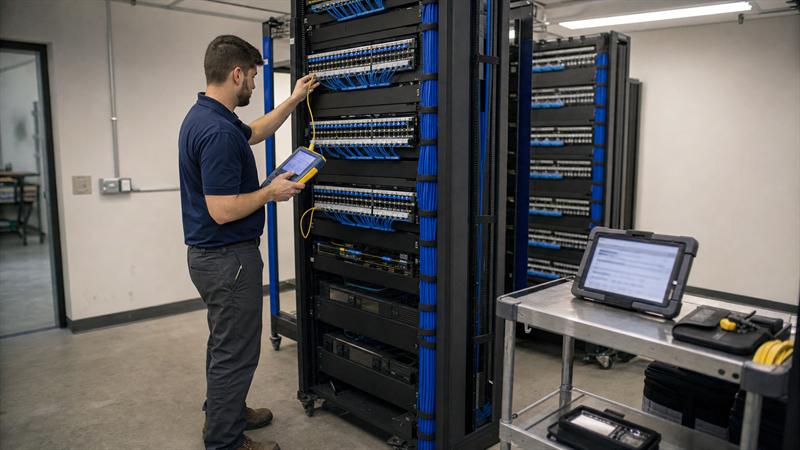
Cabling is part of the network standard, not a separate construction detail. The standard should address cable types, pathway planning, patch-panel organization, rack layout, labeling, power availability, equipment-room conditions, and fiber uplinks where distance or building layout requires them.
Unlabeled cables and inconsistent rack layouts are a common source of avoidable support work. A switch port may be configured correctly, but that information is less useful when the physical cable run is unclear. Planning structured cabling before installation can create a more maintainable foundation for each location.
For a closer look at the physical infrastructure decisions involved, see what businesses should know before structured cabling installation.
Device Naming, Configuration Records, Diagrams, and Asset Tracking
Every site should have current diagrams, device inventory, port maps, configuration records, circuit details, wireless information, and administrative ownership details. These records should show the intended baseline and any approved deviations.
Documentation is not only a project closeout item. It is the reference used during troubleshooting, equipment replacement, renovation work, new-device deployment, and support transitions. When records are scattered across emails, spreadsheets, and individual memory, the network becomes harder to manage each time the business changes.
Monitoring, Support Escalation, Maintenance, and Replacement Planning
Standardization continues after the network goes live. A support-ready standard identifies who receives alerts, who owns updates, how remote or on-site support is handled, where current records are kept, and how aging equipment or capacity constraints are reviewed.
This can become more difficult when a location is treated as complete after installation. Growth, staffing changes, new cloud tools, renovations, and added devices gradually change the network’s demands. Network maintenance helps keep the standard connected to how the business operates now, not only how it operated on installation day.
Validate Each Location Before Reusing the Standard
A baseline should be reused, but it should not be copied without site validation. Each building introduces physical and operational conditions that can affect cabling, wireless coverage, equipment placement, connectivity, and future support.
How to validate a network standard at a new location:
- Review the floorplan, construction, equipment spaces, and intended workflows.
- Assess cable pathways, existing infrastructure, rack capacity, power, and carrier options.
- Confirm which baseline components apply without change.
- Identify site-specific requirements before installation begins.
- Document approved exceptions in the deployment package.
- Test the completed site against the approved design and update the records.
Review Floor Plans, Construction, Cable Pathways, and Equipment Spaces
Floorplan dimensions, wall materials, ceiling access, conduit availability, cable routes, telecom room placement, rack capacity, and power conditions can shape the final installation. These details affect where equipment can be installed and how it can be maintained.
This is where physical infrastructure planning matters. A network diagram may show the same architecture at two sites, but one location may require a different cable route, additional fiber, or a revised access point layout because the building does not support the original approach.
Assess Existing Cabling and Connectivity Options
Existing cabling, network closets, fiber runs, pathways, and ISP options should be reviewed rather than assumed to meet current requirements. Reusing infrastructure without checking capacity, condition, labels, and routing can carry hidden limitations into the next upgrade or troubleshooting event.
If the site has limited rack space, unknown cable labeling, aging switches, inconsistent internet records, or connectivity that does not match current operations, the standard should include an assessment step before deployment. Adding devices around those limitations may not address the underlying issue. The limitation should be documented and addressed as part of the design.
Use Wireless Surveys When Coverage, Capacity, or Roaming Matters
A wireless survey is useful for new locations, renovations, high-density areas, mobile workflows, complex floorplans, recurring Wi-Fi complaints, and environments where coverage or roaming affects daily operations. It provides a clearer view of the radio environment and how the space is used.
Access point count is not a reliable design method on its own. A warehouse, office, retail space, or mixed-use facility can have very different wireless needs even when the square footage appears similar. The survey process helps turn a general Wi-Fi standard into a design that fits the location.
Use a Controlled Exception Process
Controlled exceptions help protect the network standard. They allow a location to adapt to genuine site conditions without allowing the design to drift into undocumented workarounds.
What to document for every network exception:
- The location and affected area
- The reason the baseline cannot be followed exactly
- The technical change from the approved design
- The equipment, configuration, cabling, or connectivity change involved
- Operational and support implications
- The approver and implementation date
- The documentation location and review trigger
Without this process, exceptions can accumulate quietly. A site may have a different switch arrangement, an added wireless access point, a special carrier handoff, or a separate network segment that no one recognizes as a design change. Over time, these unknowns can make future changes more difficult.
Examples of Reasonable Site-Specific Exceptions
Reasonable exceptions are driven by real constraints, not convenience. A location may need a different carrier because the preferred service is unavailable. Another may need fiber uplinks because of the distance between rooms or buildings. A dense workspace may need additional access points because its construction and user activity differ from other sites.
These are not failures of standardization when they are evaluated and recorded. They can become problems when the design change is installed without updating diagrams, labels, configuration records, and support procedures.
What Every Exception Record Should Include
An exception record should explain what changed and why it changed. It should also identify what the change means for future support, replacement planning, documentation, and maintenance.
The distinction is simple: an approved exception gives future teams context; an undocumented exception can force future teams to rediscover the design under pressure. For multi-location businesses, the exception record helps keep local flexibility from becoming permanent uncertainty.
Build a Repeatable Deployment and Acceptance Process
Standardization is incomplete until each site is installed, tested, documented, and handed off in the same disciplined way. A location is not standardized merely because it is online. It should also match the approved design, reflect known exceptions, and be understandable to the people who will support it.
Multi-site network deployment checklist:
- Confirm site conditions and the approved deployment package.
- Verify cabling, rack, fiber, power, and equipment requirements.
- Install and label infrastructure according to the design.
- Apply approved configurations, naming, VLANs, IP plans, and SSID standards.
- Test wired, wireless, segmentation, management, and documentation requirements.
- Record exceptions and deliver current as-built records before handoff.
Pre-Installation Checklist
Before work begins, confirm floorplans, site survey findings, approved design documents, carrier details, cabling scope, rack requirements, equipment availability, building access, and escalation contacts. Known exceptions should be included in the deployment package before technicians arrive on site.
This helps avoid field improvisation. When installers discover missing details after arrival, the project can shift from controlled implementation to immediate decisions based on incomplete information.
Installation and Configuration Checklist
Installation should follow the approved design for cabling, racks, fiber, switches, edge equipment, and wireless access points. Apply naming conventions, VLAN assignments, IP plans, SSID standards, labels, and configuration controls during installation rather than trying to normalize the site later.
Any deviation should be recorded before project closeout. This helps keep the as-built network aligned with the actual installation rather than only the original plan.
Test, Document, and Hand Off Each Site
Acceptance testing should verify wired connectivity, wireless operation, segmentation behavior, management access, device visibility, uplinks, labels, and current documentation. Diagrams, port maps, asset records, configuration backups, and support contacts should be complete before the site is handed over.
Testing is not only a final step. It should inform the design, validate installation, and confirm that the support team receives accurate records. If a site cannot be supported without calling the installer for basic information, the standardization process is likely incomplete.
Keep the Standard Useful After the Network Goes Live
Network standards need ongoing governance. Each new device, cabling change, renovation, carrier update, wireless adjustment, or equipment replacement should either follow the baseline or become a documented exception.
This is how businesses protect the value of the original design work. Without maintenance and documentation discipline, a well-planned standard can gradually become an outdated diagram while each location drifts in a different direction.
Maintain a Current Source of Truth
Keep network diagrams, inventory, circuit records, configuration backups, port maps, cable labels, and exception logs in a current, accessible source of truth. Assign responsibility for updating those records when changes occur.
Historical knowledge held only by one employee, one installer, or one vendor can create a support gap. Current records make the network easier to maintain when responsibilities change or a location needs work quickly.
Use Recurring Support Issues to Improve the Baseline
Recurring incidents and repeated installation challenges should be reviewed for patterns. If several locations need the same workaround, the baseline may need to be updated instead of allowing each future site to repeat the same exception.
This is the practical part of lifecycle management for multi-location networks. The standard should improve through controlled updates based on deployment and support experience, not remain fixed while business requirements change.
Plan Refreshes and Expansions Before Infrastructure Becomes a Constraint
Review equipment age, available switch ports, wireless demands, cabling condition, fiber requirements, and changing operational needs before they become a bottleneck. A consistent standard makes this review easier because each location can be compared against the same baseline.
If locations show different device generations, limited capacity, incomplete documentation, recurring Wi-Fi issues, or growing numbers of one-off changes, the network may already be drifting from its standard. That can indicate that an assessment and prioritized update plan are needed before the next expansion adds more complexity.
When to Bring in Network Infrastructure Support
Network infrastructure support can be useful when a business is opening locations, consolidating inconsistent designs, moving offices, renovating space, addressing recurring Wi-Fi concerns, documenting cabling, adding fiber, or supporting sites without dedicated on-site IT staff.
Ascio Wireless, LLC provides networking, wireless surveys, structured cabling, data cabling, fiber optic cabling, IT smart hands, technical support, on-site network support, and network maintenance. These services work together because a multi-site standard needs both a sound design and an implementation process that preserves the design after the work is complete.
If you are seeing these signs, the network standard may need attention:
- Each location has different diagrams, naming rules, Wi-Fi settings, or switch configurations.
- Support teams spend time figuring out how a site was built before they can address the actual issue.
- New locations are designed from scratch because there is no approved baseline or current deployment package.
- Renovations, added equipment, and cabling changes are not reflected in the network records.
These conditions can lead to more network drift with every change. A formal assessment, documented baseline, and controlled deployment process can be useful before the next site opening or upgrade adds more complexity.
Key Takeaways
- Multi-site network standardization is a repeatable baseline, not an identical hardware list.
- A complete standard covers wired and wireless design, cabling, configuration, documentation, testing, and maintenance.
- Each location needs validation against its building conditions, connectivity options, and operational requirements.
- Controlled exceptions allow necessary flexibility without creating hidden technical debt.
- Current records and ongoing maintenance help keep a standard useful as locations expand and change.
Conclusion: Standardize the Decisions That Affect Every Location
The real problem is not that locations have differences. The problem is when those differences are unplanned, undocumented, and discovered only after support work becomes urgent. This can lead to slower troubleshooting, inconsistent upgrades, uncertain cabling conditions, and more complexity as the business grows.
Ascio Wireless, LLC provides a practical next step for businesses that need to establish or restore consistency across multiple locations. Through network assessments, wireless surveys, structured cabling, fiber infrastructure, installation support, and ongoing maintenance, Ascio Wireless, LLC can help turn disconnected site decisions into a documented, supportable standard. Start by comparing current locations against a shared baseline and use a multi-location network design strategy to identify where standardization should begin.
Frequently Asked Questions
What does multi-site network standardization include?
Multi-site network standardization includes the repeatable decisions required to design, install, support, and maintain networks across locations. This includes internet and edge design, switching roles, VLAN and IP-addressing conventions, Wi-Fi standards, cabling and fiber requirements, labeling, documentation, testing, monitoring, maintenance, and exception management.
The key distinction is that standards cover both the logical network and the physical infrastructure. Standardizing VLAN names without maintaining rack layouts, port maps, cable labels, and current diagrams can still leave support teams without the information needed to work efficiently.
Should every business location have the exact same network equipment?
No. Locations should follow the same design principles, documentation rules, and device roles, but they do not always need the same equipment count or physical layout. A warehouse with long cable runs, a small office, and a dense workspace can require different switches, access point placement, fiber links, or rack arrangements.
What matters is that the difference is intentional and recorded. For example, a location can use additional access points because of building materials and user density while still following the same SSID structure, segmentation rules, naming conventions, and support process.
How do businesses standardize Wi-Fi across multiple locations?
Businesses standardize Wi-Fi by defining shared SSID names, authentication rules, guest-access handling, segmentation, access point naming, configuration practices, documentation, and testing requirements. These controls can make wireless support more consistent across locations.
Access point placement remains site-specific because physical environments differ. Building materials, ceiling access, equipment, shelving, user density, mobile devices, and roaming needs affect the final design. The Wi-Fi standard should define the process, while a survey or site review informs the placement.
What should be documented for each network location?
Each location should have current network diagrams, device inventory, IP and VLAN records, circuit details, rack layouts, cable labels, port maps, configuration backups, wireless details, support contacts, and approved exception records. The records should show both the baseline design and the local changes made to it.
Documentation needs to change with the network. If an access point is moved, a switch is added, a cable is rerouted, or a new carrier circuit is installed, the related records should be updated at the same time. Otherwise, the documents describe the old network rather than the one being supported.
How do you handle network design differences between locations?
Handle design differences through a controlled exception process. Record why the site cannot follow the baseline, describe the technical change, identify affected systems, note the support implications, obtain approval, and update the as-built documentation.
For example, a location may need a fiber uplink because the distance between network rooms makes a standard copper run impractical. That is a valid exception when it is documented and supported. It can become a problem when the change is invisible to future technicians and support teams.
When is a wireless survey needed for a new location?
A wireless survey is useful for new deployments, renovations, complex floorplans, high-density spaces, mobile workflows, recurring Wi-Fi problems, and areas where reliable roaming is important. It helps assess how building conditions and business activity affect wireless planning.
Square footage alone does not determine access point count or placement. A site survey helps translate a company-wide Wi-Fi standard into a design that fits the location’s construction, layout, devices, and daily operations.