 Follow us on Facebook
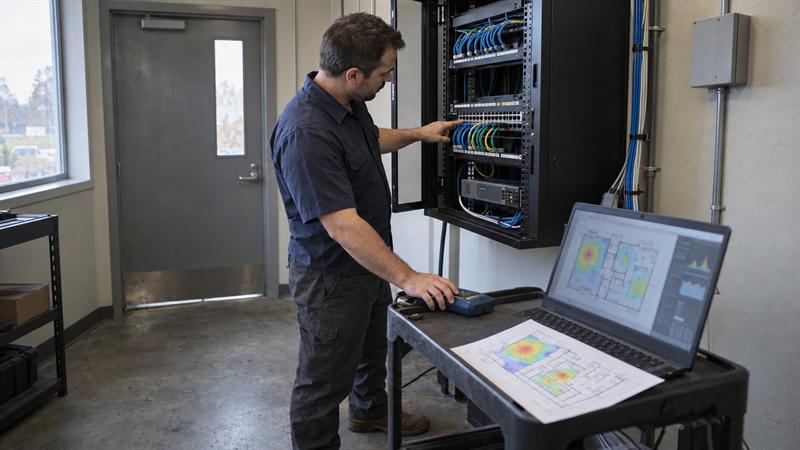
At Ascio Wireless, the gap that turns a useful assessment into a document that never gets used is not a missing test. It is the absence of a document package that connects findings to the next action. If you are still deciding whether your symptoms require a formal review, start with the signs your business network needs an upgrade.
Why Deliverables Define the Value of a Business Network Assessment
Deliverables define value because they turn observations into documents your team can use without waiting for the assessor to return. A summary that says infrastructure needs attention does not answer who, what, where, or by when.
A useful assessment supports budget requests, maintenance work orders, and future implementation scopes. Documentation quality is one of the fastest practical ways to compare two proposals at the same price.
The Difference Between an Assessment and a Network Health Snapshot
A network health snapshot is a point-in-time log. An assessment is a set of connected records that support decisions. A snapshot names a symptom. An assessment maps the path to a fix.
- A snapshot says a switch is near capacity.
- An assessment shows which departments feed that switch and which fix is practical.
- A snapshot says a zone has weak signal.
- An assessment ties that zone to access points, cabling, interference, and the coverage standard the business set.
Why Documentation Matters More Than a Summary of Problems
Documentation outlives the engagement. If the only output is a list of issues, the business cannot budget, phase, or assign work with confidence.
Labeled port maps, termination records, heat maps anchored to floor plans, and a device inventory become the reference file for every future maintenance call. Reports that omit physical location details and test results create workarounds the team has to repeat on every ticket.
Scope Areas to Include in a Business Network Assessment
A business network assessment scope should include device and infrastructure discovery, wired network testing, wireless survey and coverage review, a performance and capacity baseline, and a security review where applicable. These areas keep the work tied to what the building contains and how users experience it.
Each area below defines what should be tested so a vendor proposal can be checked against a clear standard.
Site, Device, and Infrastructure Discovery
Discovery confirms what exists and where before testing begins. It should produce a site map with device callouts, not a generic diagram pulled from a template.
- Walk every floor, room, and closet in scope.
- Log every switch, access point, router, patch panel, and server in scope.
- Record make, model, firmware or OS version, and serial number.
- Note rack space, cable management, and labeling condition.
- Flag undocumented or rogue devices.
Wired Network Testing and Cabling Documentation
Wired testing verifies each link and documents the path so maintenance staff can use the result. It covers the copper and fiber runs that carry daily operations, not only the devices that appear healthy in a scan.
- Certify or verify each link where appropriate.
- Identify terminated and unterminated drops.
- Document patch panel port mapping and riser paths.
- Separate copper, data, voice, fiber, and coaxial runs in mixed buildings.
- Tie each result to the floor plan.
At Ascio Wireless, this is a common breakdown point: the report gives a pass/fail count, the count looks clean, and the building still lacks the records a technician needs on the next service call.
Wireless Survey, Coverage, and Interference Review
A wireless survey should explain where users can connect, where they cannot, and why. It verifies the environment against real usage patterns, not just whether the SSID is visible.
- Collect heat maps by floor and room.
- Validate channel, power, and band settings for each access point.
- Identify co-channel and adjacent-channel interference.
- Note other wireless RF sources in the space.
- Mark dead zones and high-density areas where capacity drives the issue.
Heat maps tied to user areas give the reader a standard they can defend in a budget discussion. A map that shows only access point locations without room context is harder to act on.
Performance, Capacity, and Utilization Baseline
A performance baseline records how the network is working before changes are recommended. It helps separate a capacity issue from a configuration issue and gives future staff a normal state to compare against.
- Capture switch port and uplink utilization at peak and off-peak times.
- Measure latency and jitter on key paths.
- Note PoE budget usage on switches.
- Record application expectations for video, cloud files, and VoIP.
A switch running near capacity is a budget conversation. A VoIP path that degrades during the morning call block is an operational issue that needs a different fix.
Security and Compliance Review Where Applicable
A security review in this assessment should stay in scope for infrastructure findings and refer out for dedicated security work when needed. It should note unencrypted management interfaces, default credentials on managed devices, missing guest VLAN separation, and unauthorized access points.
Its job is to help the reader allocate follow-up work correctly. It should not promise compliance or replace a formal security engagement.
Standard Deliverables a Business Should Expect
A business should expect seven core deliverables from a complete network assessment:
- Asset and location inventory for every device.
- Network topology with physical and logical paths.
- Wireless heat maps anchored to floor plans.
- Cabling and termination report with port-level detail.
- Performance baseline and fault summary.
- Prioritized findings ranked by impact and effort.
- Upgrade and maintenance planning package.
The exact mix changes with building size and scope. The pattern should not change.
Asset and Location Inventory
An asset and location inventory lists every device with enough detail to find it quickly, without opening every rack and cabinet. It is the baseline for maintenance, security review, and upgrades.
Each entry should include make, model, serial number, firmware or OS version, physical location, and connection type. The inventory should be a searchable spreadsheet or database export, not a narrative paragraph.
Network Topology and Logical Path Documentation
Network topology should show both the physical path and the logical path user traffic follows. It replaces the auto-discovery diagram that lists IP addresses without context.
- Physical layer: panel port to switch port paths.
- Logical layer: VLANs, routing, management plane, and wireless relationships.
- Backbone layer: inter-floor and inter-building links with capacity.
One diagram used for both floor detail and core design hides the gaps. The reader needs to see the path from wall jack to core.
Wireless Coverage Heat Maps and RF Findings
Wireless heat maps should be one per floor or zone, overlaid on the floor plan or measured site plan. Each map should show SSID, channel, power level, and pass or fail against the coverage standard the business set.
The RF findings section should list interference sources by location, note channel overlap, and identify whether band steering is configured where appropriate. The maps should be in a format facilities and installers can print and reference.
Cabling, Termination, and Infrastructure Report
A cabling report should give a per-link schedule a technician can use without prior knowledge of the building. It includes port number, cable type, length, test result, and physical path.
- Per-link schedule with port, media, length, and result.
- Physical path in plain location language.
- Non-standard runs such as temporary bridges or mixed media.
- Labeling gaps that slow future maintenance.
This report is where a new technician stops guessing and starts testing.
Performance Baseline and Fault Summary
A performance baseline and fault summary should show measured values and separate observed conditions from reported symptoms. This distinction keeps the report honest and helps prioritize real issues.
- Measured values for utilization, latency, jitter, and PoE budget.
- A fault log tied to device and location.
- Observed versus reported status for each issue.
At Ascio Wireless, this section is the clearest marker of a report built for operators rather than for the file. It shows what was measured, not just what users reported.
Prioritized Findings and Recommendations
Prioritized findings should rank issues by operational impact and effort category, not by hardware price. Each finding states what was found, where it is, why it matters to the business, and what action is recommended.
- What: the issue and device or zone involved.
- Where: floor, closet, panel, room, or logical path.
- Why: business impact such as dropped calls or slow file access.
- Action and effort: config change, device swap, cabling rework, or redesign.
A finding without a recommended action is an observation, not a decision input. This section is what makes the rest of the report useful to finance and operations.
If your current proposal is missing several of the core documents above, the project is likely under-scoped, and the results may be harder to defend in a budget meeting. That is a sign the scope needs revision before work begins.
Upgrade, Maintenance, and Support Planning Packages
The planning package turns findings into three artifacts: a budget request, a maintenance reference, and an implementation scope. It makes the next step visible without forcing a single project.
- Budget request that maps effort categories to capex or opex.
- Maintenance reference for regular checks.
- Implementation scope with phasing and dependencies.
If upgrades are phased, the plan notes dependencies, such as re-terminating uplink fiber before a core switch cutover when that path is affected. The document is a roadmap, not a sales quote.
How to Evaluate a Vendor’s Network Assessment Scope
Evaluate a vendor’s scope by documentation specificity, testing depth, and whether discovery, testing, and recommendation are separated. Price and marketing language should not drive the comparison.
Questions to Ask Before Awarding Work
Use these questions before awarding the work. They give enough granularity to compare proposals side by side.
- What exact documents will I receive, and in what format?
- Will the scope include physical and logical inventory, or only a device scan?
- How many on-site hours are included for all floors and closets?
- Will cabling documentation be port-level or only pass/fail?
- Will wireless heat maps be tied to the floor plan?
- Is implementation priced separately from the assessment?
Common Scope Gaps and Red Flags
Scope gaps appear when a proposal uses broad language instead of testable deliverables. Watch for these patterns before signing.
- A “network audit” line item without discovery, wired testing, wireless survey, or performance baseline.
- A wireless survey without pre-deployment, concurrent, or post-deployment validation where the project calls for it.
- A bundled quote that leaves the standalone assessment scope unclear.
- A deliverable list without document types or formats.
- A remote-only scope when physical cabling, rack, and wireless verification are still needed.
When these signs appear, the scope needs revision before work begins.
When to Limit the Assessment Scope
Limit the assessment scope when the business question is narrow. If the issue is weak Wi-Fi on one floor, a targeted wireless survey is often enough. If the concern is a single switch replacement, a port map and firmware check on that switch and its uplinks may be the right scope.
Scoping to the actual question saves cost and produces a shorter, more focused document. Ask the vendor to propose the minimum scope that answers the question, then verify it against the deliverable list in this article.
Turning Assessment Results Into a Decision Package
Assessment results become a decision package when they feed three conversations: finance, maintenance, and implementation. The documents connect the current problem to budget, support, and future work.
Translating Findings Into Budget and Phasing
A prioritized findings list should translate directly into budget and phasing decisions. The IT lead groups items into near-term fixes, this-year capital projects, and long-term planning.
- Near-term: config changes, firmware updates, labeling fixes.
- This year: switch replacement, added access points, riser re-termination.
- Long-term: cabling recertification, fiber backbone upgrade, expansion planning.
If the findings list does not support this grouping, it is unlikely to be ready for a budget meeting.
Using Deliverables for Future Maintenance and Support
The inventory, cabling schedules, and heat maps become the working reference for future maintenance and on-site support. A technician opens the cabling schedule, finds the port, and tests the run without pulling wires to trace the path.
The performance baseline gives the team a normal state to compare against. Heat maps verify that coverage held after a hardware swap. The baseline data feeds directly into a recurring network maintenance checklist for businesses, turning a one-time document into an operational reference.
When an Assessment Becomes an Implementation Project
An assessment becomes an implementation project when findings show the current infrastructure cannot be patched into practical condition. Aging copper beyond its spec, exhausted PoE budget, or coverage gaps that channel changes cannot close often require planned replacement work.
At that point, the deliverable documents become the project scope. The inventory defines what is replaced. The topology defines what is reconnected. The cabling schedule defines what is re-terminated. The heat maps define the finished wireless standard. The implementation scope should be a separate document with independent pricing. For the execution sequence once approval is in hand, see how to audit and upgrade legacy network infrastructure.
Conclusion: What a Strong Business Network Assessment Delivers
The core problem is not a missing diagnostic. It is a diagnostic that does not become usable documentation. Without the seven deliverables in this article, the same issues can resurface on the next ticket, budget requests arrive unsupported, and the building keeps running on incomplete knowledge.
When a business is ready to move from symptoms to an approved project, Ascio Wireless, LLC can be a practical next step. The company’s wireless surveys, structured cabling, on-site network support, and network maintenance services are built around the documentation-first approach this article describes, so the documents your team receives are designed for the maintenance calls, upgrade decisions, and budget meetings that follow. Before signing an assessment scope, compare the proposed documents to the seven-deliverable list in this article. That comparison can help show whether the proposal will hold up in a budget meeting or end up on a shelf.
Key Takeaways
- Assessment value comes from usable documents, not a diagnosis alone.
- Scope should name discovery, wired testing, wireless survey, performance, and security review, where applicable, as separate areas.
- Deliverables should be location-aware and anchored to floor plans or measured site plans to support maintenance and future projects.
- Findings should rank by business impact and effort category so finance can phase them without technical interpretation.
- Assessment and implementation are easier to evaluate as separate scopes with separate pricing.
How Ascio Wireless, LLC approaches this work
At Ascio Wireless, network infrastructure work is treated as the start of an ongoing relationship, not a one-time diagnostic. Wireless surveys, structured and data cabling, on-site network support, and network maintenance all draw from the same documentation set, so the cabling schedule a technician uses on a support call is the same one the project manager uses to scope a future upgrade.
That continuity is what separates a deliverable that gets filed from one that gets used. When a business needs an assessment that will still be relevant on future maintenance visits, the practical path is to hold the scope to the standards in this article.
Frequently Asked Questions
How long does a typical business network assessment take?
It depends on building size, floor count, documentation availability, and whether both wired and wireless scope are included. A smaller single-floor office with a limited device count needs a shorter onsite review than a multi-floor commercial building with structured cabling, fiber risers, and a full wireless survey. Remote preparation with floor plans and device lists should happen before the on-site window to keep the review focused.
Do I need a full assessment if I already have a network diagram?
A basic diagram is a starting point, not a substitute. It does not include test results, cabling certification data, RF measurements, or a performance baseline. If the diagram was created at original install and has not been updated, it likely does not reflect added access points, temporary splices, or repurposed copper runs. If the diagram cannot show which panel port feeds a specific outlet without someone physically tracing the cable, the wired scope is still needed.
What is the difference between a wireless survey and a full network assessment?
A wireless survey covers the RF environment: heat maps, channel analysis, interference, and access point configuration. A full network assessment adds wired infrastructure, logical configuration, performance baselines, and the complete documentation package. A survey helps determine whether wireless meets a coverage spec. An assessment helps determine whether the full path from wall jack to core is working as designed. For a single-floor Wi-Fi issue, a survey may be enough. For relocation, expansion, or major hardware changes, an assessment is often the right starting document.
How often should a business network assessment be repeated?
There is no fixed calendar interval. A full reassessment is usually triggered by a significant change: new floors, a relocation, major hardware replacement, or a major shift in network applications. Without a major change, a regular review of the performance baseline, wireless heat maps, and cabling documentation is usually sufficient. A key factor is whether the documentation still matches the physical environment. If the inventory still matches what is in the racks and the heat maps still match the AP placement, that is a strong sign the assessment is still current.